Webhook Triggers
Webhooks are configured to send notifications based on trigger events. The available triggers include:
-
responseCreated
-
responseUpdated
-
responseFinished
Creating Webhooks
You can create webhooks either through the Formbricks App UI or programmatically via the Webhook API.
Creating Webhooks via UI
- Log in to Formbricks
and click on the
Configuration tab in the left sidebar and then click on the Integrations tab.
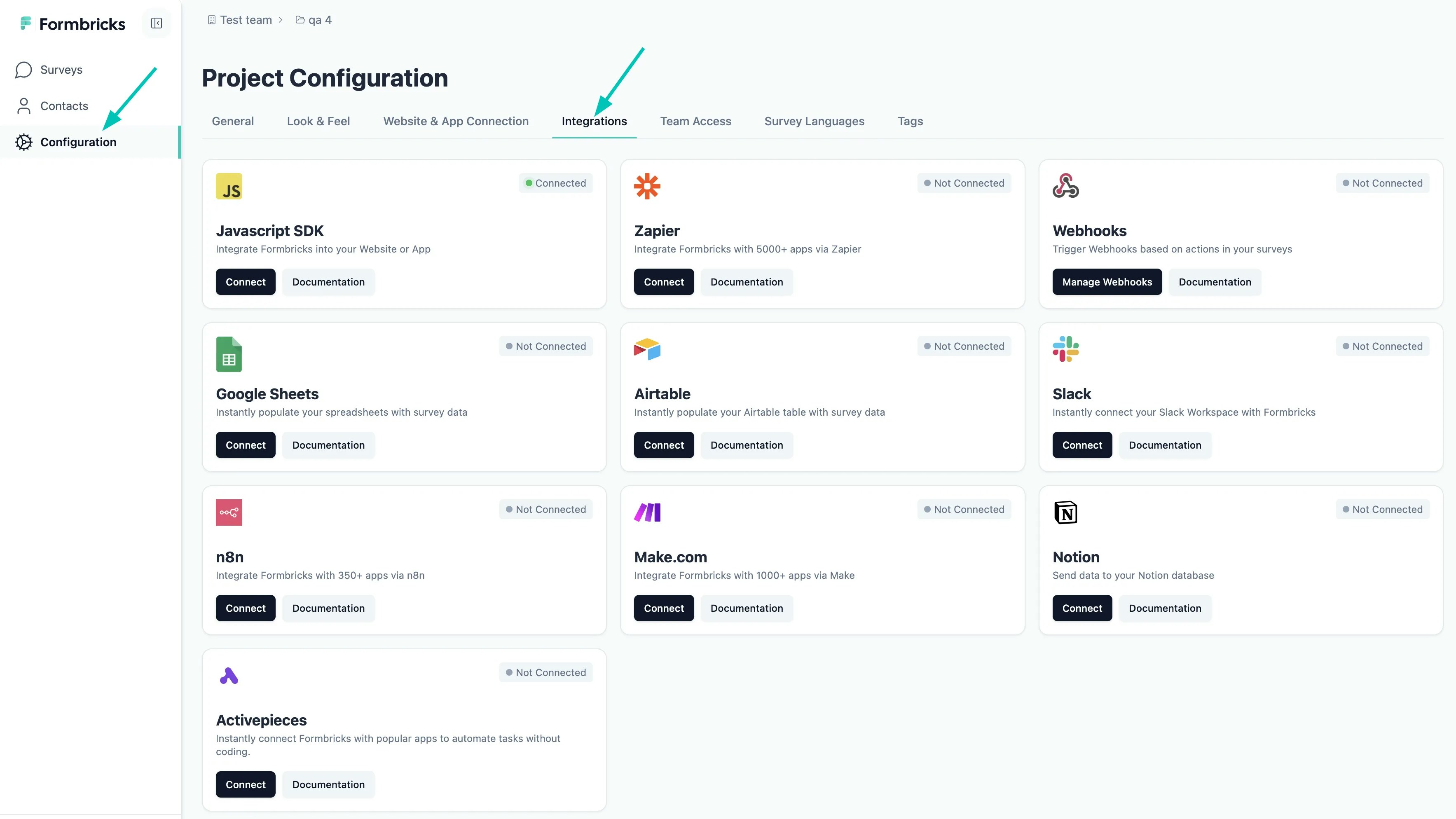
- Click on Manage Webhooks & then Add Webhook button:
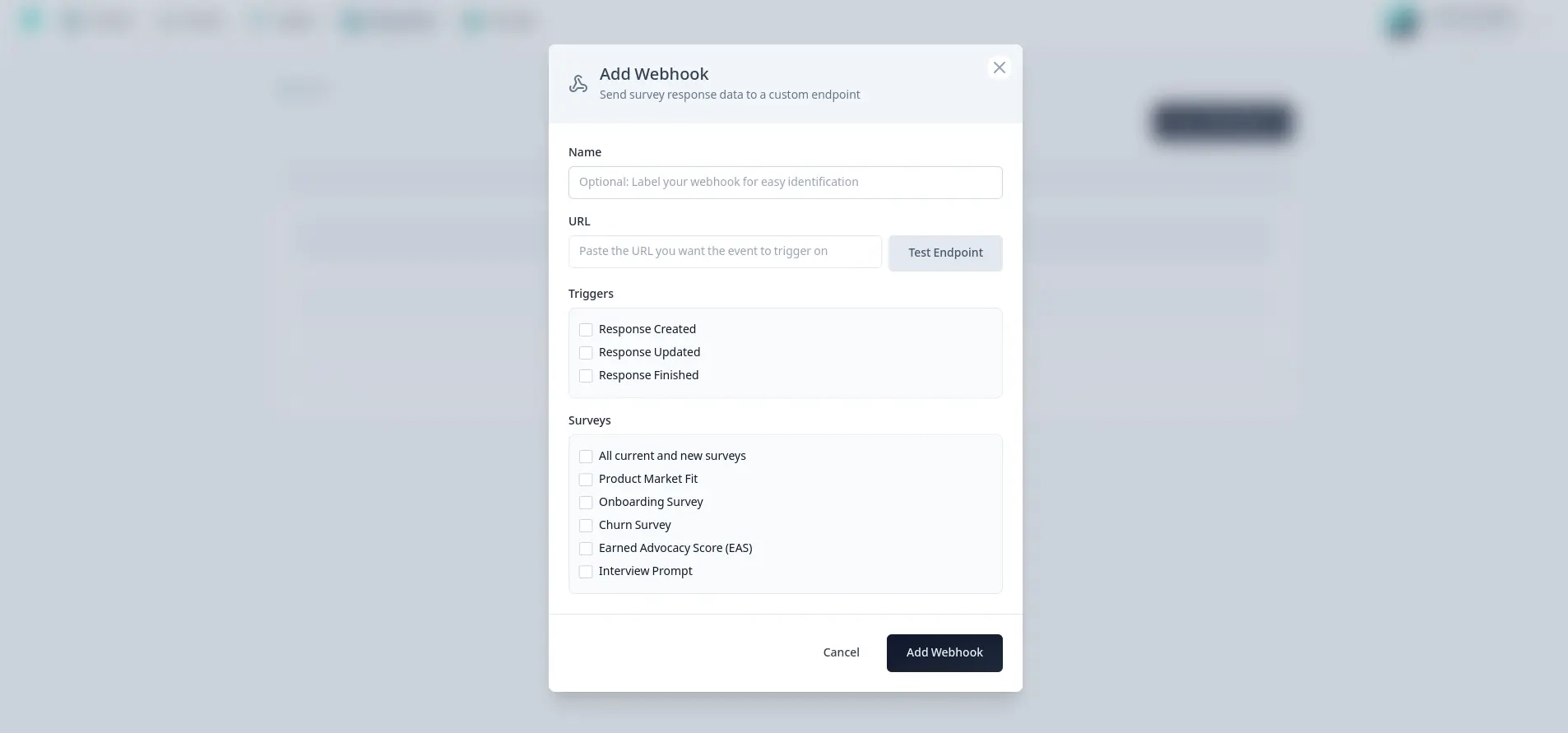
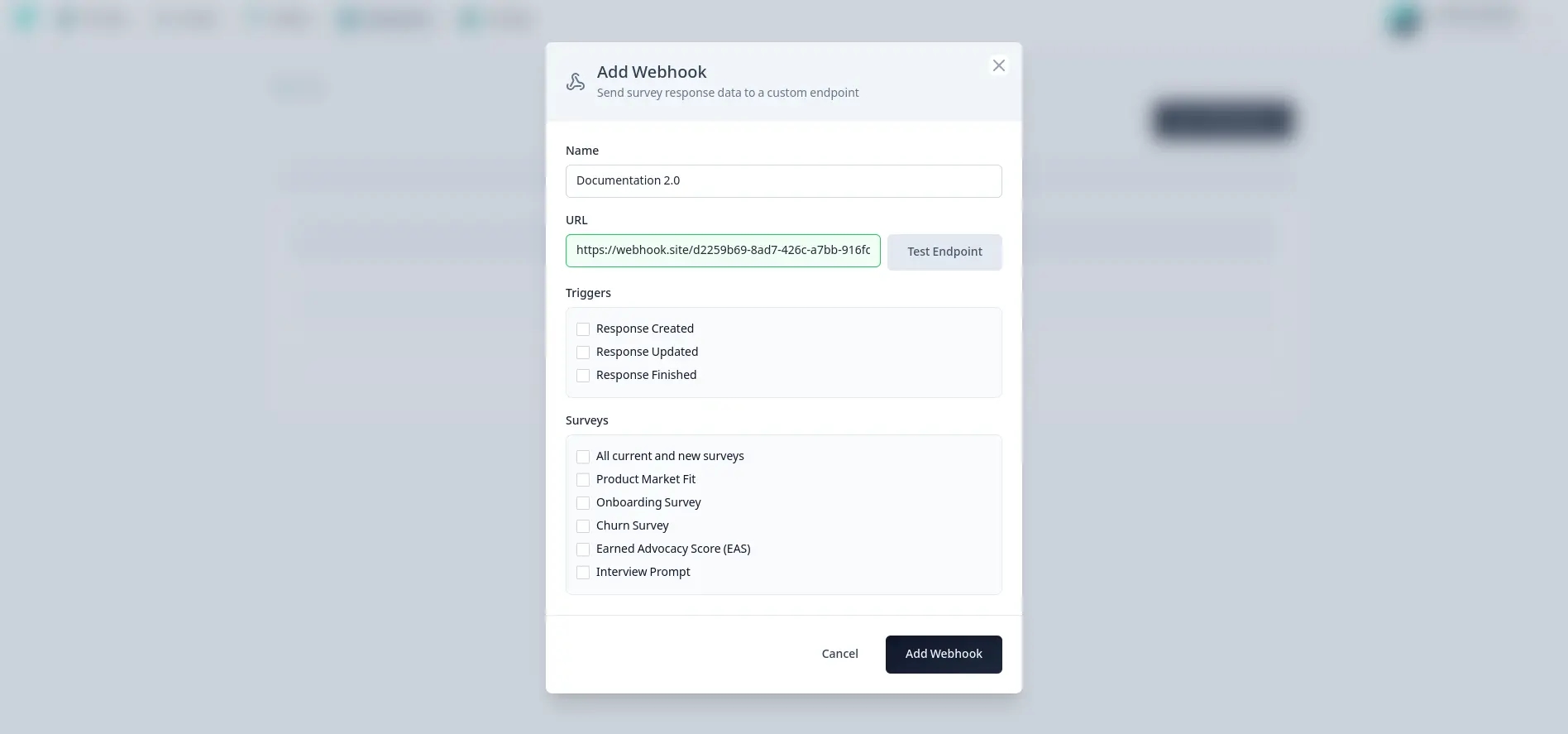
- Add your webhook listener endpoint and test it to make sure the endpoint is reachable and accepts
POST
requests.
-
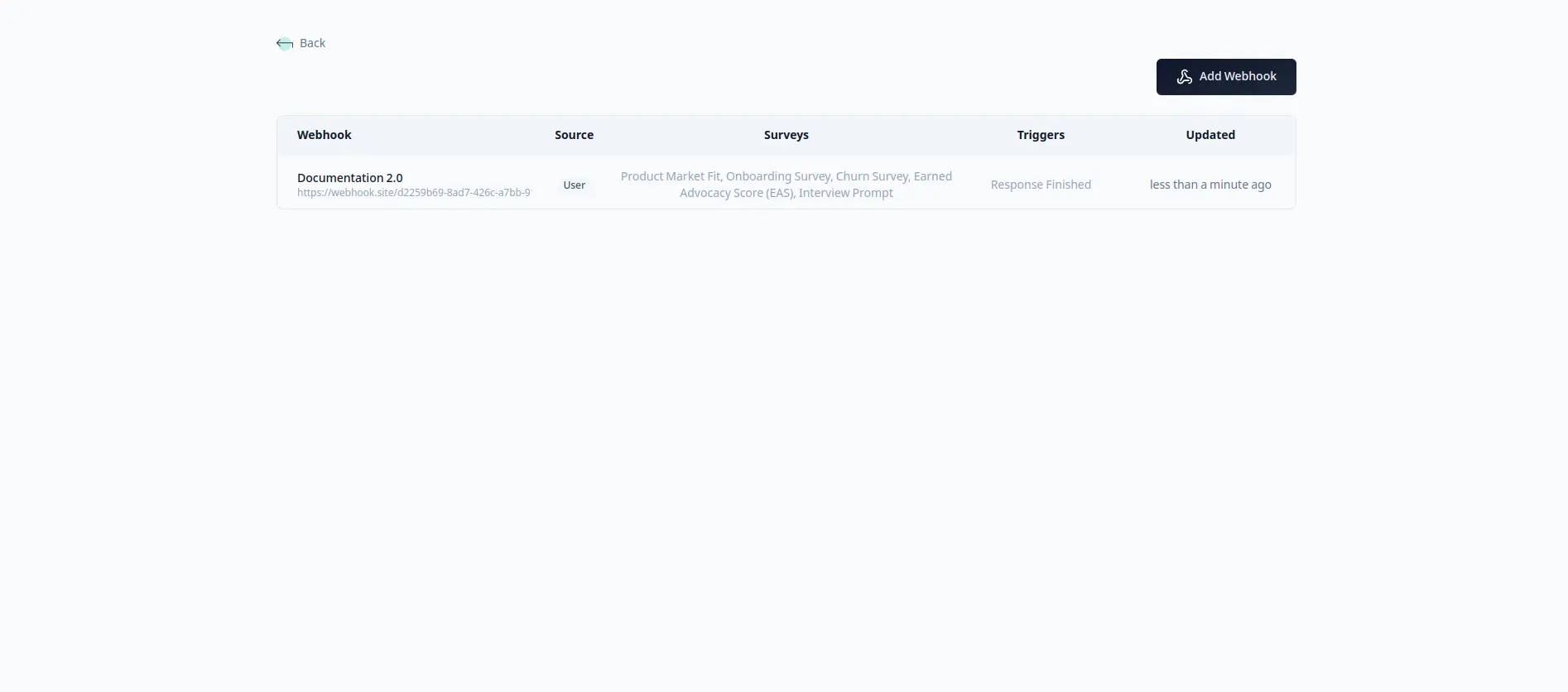
Now add the triggers you want to listen to and the surveys!
-
That’s it! Your webhooks will now start receiving data as soon as it arrives!
Creating Webhooks via API
Use our documented methods on the Creation, List, and Deletion endpoints of the Webhook API mentioned in our API v2 playground.
Testing Webhooks Locally
If you want to test a webhook consumer running on your machine before deploying it, you can expose your local
endpoint with ngrok.
Start your local webhook listener
Run your local endpoint on a port like 3000.
Expose it with ngrok
Create a public HTTPS URL for your local service, for example with ngrok http http://localhost:3000.
Use the public URL in Formbricks
Paste the ngrok URL into your webhook endpoint, click Test Endpoint, and then save the webhook once the
endpoint is reachable.
To avoid sending unwanted test responses to production workflows, copy the survey to your Test
Environment and use that survey copy in your development
workflow while validating the webhook setup.
Webhook Security with Standard Webhooks
Formbricks implements the Standard Webhooks specification to ensure webhook requests can be verified as genuinely originating from Formbricks.
Every webhook request includes the following headers:
| Header | Description | Example |
|---|
webhook-id | Unique message identifier | 019ba292-c1f6-7618-aaf2-ecf8e39d1cc7 |
webhook-timestamp | Unix timestamp (seconds) when the webhook was sent | 1704547200 |
webhook-signature | HMAC-SHA256 signature (only if secret is configured) | v1,K3Q2bXlzZWNyZXQ= |
Signing Secret
When you create a webhook (via the UI or API), Formbricks automatically generates a unique signing secret for that webhook. The secret follows the Standard Webhooks format: whsec_ followed by a base64-encoded random value.
Via UI: After creating a webhook, the signing secret is displayed immediately. Copy and store it securely—you can also view it later in the webhook settings.
Via API: The signing secret is returned in the webhook creation response.
This secret is used to generate the HMAC signature included in each webhook request, allowing you to verify the authenticity of incoming webhooks.
Signature Verification
The signature is computed as follows:
signed_content = "{webhook-id}.{webhook-timestamp}.{body}"
signature = base64(HMAC-SHA256(secret, signed_content))
header_value = "v1,{signature}"
Validating Webhooks
To validate incoming webhook requests:
- Extract the
webhook-id, webhook-timestamp, and webhook-signature headers
- Verify the timestamp is within an acceptable tolerance (e.g., 5 minutes) to prevent replay attacks
- Decode the secret by stripping the
whsec_ prefix and base64 decoding the rest
- Compute the expected signature using HMAC-SHA256 with the decoded secret
- Compare your computed signature with the received signature (after stripping the
v1, prefix)
Node.js Verification Functions
const crypto = require("crypto");

const WEBHOOK_TOLERANCE_IN_SECONDS = 300; // 5 minutes

/**
 * Decodes a Formbricks webhook secret (whsec_...) to raw bytes
 */
function decodeSecret(secret) {
  const base64 = secret.startsWith("whsec_") ? secret.slice(6) : secret;
  return Buffer.from(base64, "base64");
}

/**
 * Verifies the webhook timestamp is within tolerance
 * @throws {Error} if timestamp is too old or too new
 */
function verifyTimestamp(timestampHeader) {
  const now = Math.floor(Date.now() / 1000);
  const timestamp = parseInt(timestampHeader, 10);

  if (isNaN(timestamp)) {
    throw new Error("Invalid timestamp");
  }

  if (Math.abs(now - timestamp) > WEBHOOK_TOLERANCE_IN_SECONDS) {
    throw new Error("Timestamp outside tolerance window");
  }

  return timestamp;
}

/**
 * Computes the expected signature for a webhook payload
 */
function computeSignature(webhookId, timestamp, body, secret) {
  const signedContent = `${webhookId}.${timestamp}.${body}`;
  const secretBytes = decodeSecret(secret);
  return crypto.createHmac("sha256", secretBytes).update(signedContent).digest("base64");
}

/**
 * Verifies a Formbricks webhook request
 * @param {string} body - Raw request body as string
 * @param {object} headers - Object containing webhook-id, webhook-timestamp, webhook-signature
 * @param {string} secret - Your webhook secret (whsec_...)
 * @returns {boolean} true if valid
 * @throws {Error} if verification fails
 */
function verifyWebhook(body, headers, secret) {
  const webhookId = headers["webhook-id"];
  const webhookTimestamp = headers["webhook-timestamp"];
  const webhookSignature = headers["webhook-signature"];

  if (!webhookId || !webhookTimestamp || !webhookSignature) {
    throw new Error("Missing required webhook headers");
  }

  // Verify timestamp
  const timestamp = verifyTimestamp(webhookTimestamp);

  // Compute expected signature
  const expectedSignature = computeSignature(webhookId, timestamp, body, secret);

  // Extract signature from header (format: "v1,{signature}")
  const receivedSignature = webhookSignature.split(",")[1];

  if (!receivedSignature) {
    throw new Error("Invalid signature format");
  }

  // Use constant-time comparison to prevent timing attacks
  const expectedBuffer = Buffer.from(expectedSignature, "utf8");
  const receivedBuffer = Buffer.from(receivedSignature, "utf8");

  if (
    expectedBuffer.length !== receivedBuffer.length ||
    !crypto.timingSafeEqual(expectedBuffer, receivedBuffer)
  ) {
    throw new Error("Invalid signature");
  }

  return true;
}

module.exports = { verifyWebhook, decodeSecret, computeSignature, verifyTimestamp };
// In your webhook handler, use the raw body (not parsed JSON)
try {
  verifyWebhook(rawBody, req.headers, process.env.FORMBRICKS_WEBHOOK_SECRET);
  const payload = JSON.parse(rawBody);
  // Process verified webhook...
} catch (error) {
  // Verification failed - reject the request
  console.error("Webhook verification failed:", error.message);
}
Always use the raw request body (as a string) for signature verification, not the parsed JSON object.
Parsing and re-stringifying can change the formatting and break signature validation.
Using Standard Webhooks Libraries
You can also use the official Standard Webhooks libraries available for various languages:
- Node.js:
npm install standardwebhooks
- Python:
pip install standardwebhooks
- Go, Ruby, Java, Kotlin, PHP, Rust: See the Standard Webhooks GitHub
Example Webhook Payloads
We provide the following webhook payloads, responseCreated, responseUpdated, and responseFinished.
Response Created
Example of Response Created webhook payload:
{
  "data": {
    "contact": null,
    "contactAttributes": null,
    "createdAt": "2025-07-24T07:47:29.507Z",
    "data": {
      "welcome_card_cta": "clicked"
    },
    "displayId": "displayId",
    "endingId": null,
    "finished": false,
    "id": "responseId",
    "language": "en",
    "meta": {
      "country": "DE",
      "url": "https://app.formbricks.com/s/surveyId",
      "userAgent": {
        "browser": "Chrome",
        "device": "desktop",
        "os": "macOS"
      }
    },
    "singleUseId": null,
    "survey": {
      "createdAt": "2025-07-20T10:30:00.000Z",
      "status": "inProgress",
      "title": "Customer Satisfaction Survey",
      "type": "link",
      "updatedAt": "2025-07-24T07:45:00.000Z"
    },
    "surveyId": "surveyId",
    "tags": [],
    "ttc": {
      "welcome_card_cta": 2154.700000047684
    },
    "updatedAt": "2025-07-24T07:47:29.507Z",
    "variables": {}
  },
  "event": "responseCreated",
  "webhookId": "webhookId"
}
Response Updated
Example of Response Updated webhook payload:
{
  "data": {
    "contact": null,
    "contactAttributes": null,
    "createdAt": "2025-07-24T07:47:29.507Z",
    "data": {
      "visit_reason": "Just browsing",
      "welcome_card_cta": "clicked"
    },
    "displayId": "displayId",
    "endingId": null,
    "finished": false,
    "id": "responseId",
    "language": "en",
    "meta": {
      "country": "DE",
      "url": "https://app.formbricks.com/s/surveyId",
      "userAgent": {
        "browser": "Chrome",
        "device": "desktop",
        "os": "macOS"
      }
    },
    "singleUseId": null,
    "survey": {
      "createdAt": "2025-07-20T10:30:00.000Z",
      "status": "inProgress",
      "title": "Customer Satisfaction Survey",
      "type": "link",
      "updatedAt": "2025-07-24T07:45:00.000Z"
    },
    "surveyId": "surveyId",
    "tags": [],
    "ttc": {
      "visit_reason": 3855.799999952316,
      "welcome_card_cta": 2154.700000047684
    },
    "updatedAt": "2025-07-24T07:47:33.696Z",
    "variables": {}
  },
  "event": "responseUpdated",
  "webhookId": "webhookId"
}
Response Finished
Example of Response Finished webhook payload:
{
  "data": {
    "contact": null,
    "contactAttributes": null,
    "createdAt": "2025-07-24T07:47:29.507Z",
    "data": {
      "newsletter_consent": "accepted",
      "welcome_card_cta": "clicked"
    },
    "displayId": "displayId",
    "endingId": "endingId",
    "finished": true,
    "id": "responseId",
    "language": "en",
    "meta": {
      "country": "DE",
      "url": "https://app.formbricks.com/s/surveyId",
      "userAgent": {
        "browser": "Chrome",
        "device": "desktop",
        "os": "macOS"
      }
    },
    "singleUseId": null,
    "survey": {
      "createdAt": "2025-07-20T10:30:00.000Z",
      "status": "inProgress",
      "title": "Customer Satisfaction Survey",
      "type": "link",
      "updatedAt": "2025-07-24T07:45:00.000Z"
    },
    "surveyId": "surveyId",
    "tags": [],
    "ttc": {
      "_total": 4947.899999035763,
      "newsletter_consent": 2793.199999988079,
      "welcome_card_cta": 2154.700000047684
    },
    "updatedAt": "2025-07-24T07:47:56.116Z",
    "variables": {}
  },
  "event": "responseFinished",
  "webhookId": "webhookId"
}

